FluentCart Wishlist Documentation
Install, configure, and manage persistent wishlists, premium customer lists, follow-up automation, analytics, and Bricks Builder elements for FluentCart.
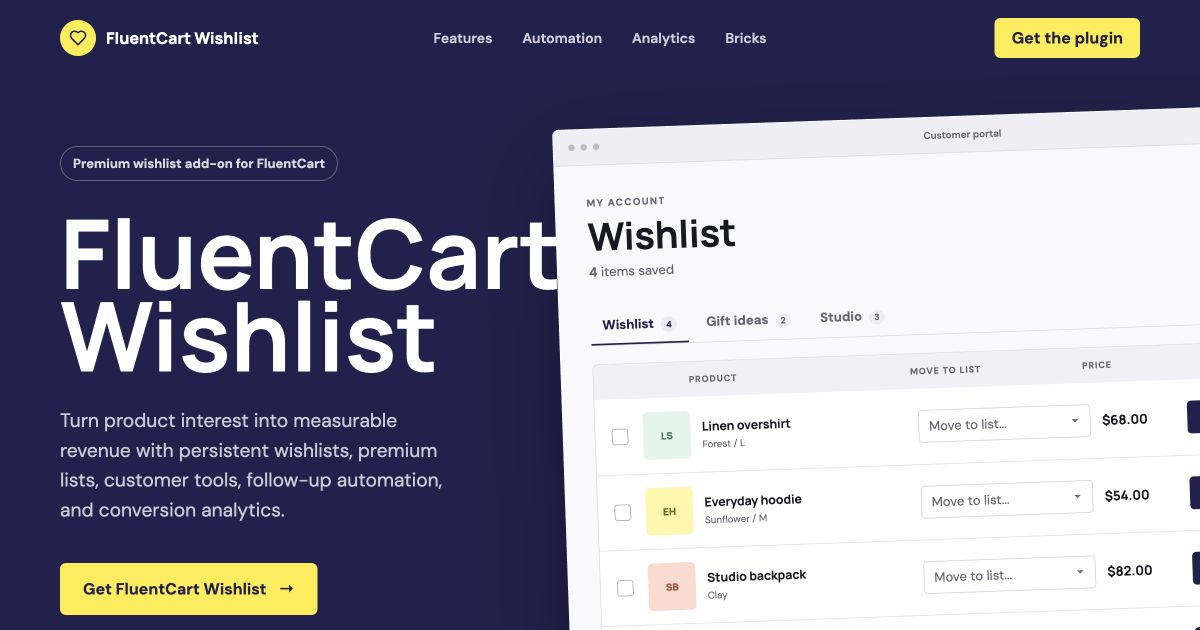
What the plugin does: It adds AJAX wishlist controls to FluentCart, stores guest and customer intent persistently, provides list management in the customer portal, and turns saved-product data into automation and analytics.
Quick start
Use this sequence for a reliable first-time setup.
Check requirements
Activate FluentCart and confirm WordPress cron and outgoing email work.
Install the plugin
Upload the plugin ZIP, activate it, and let the versioned database migration run.
Configure behavior
Open FluentCart > Wishlist and review General and Automation settings.
Test the workflow
Save a product as a guest, log in, and confirm it appears in the portal.
Requirements
- WordPress 6.0 or newer
Tested with WordPress 7.0. - PHP 7.4 or newer
OpenSSL is required for encrypted license-key storage. - FluentCart active and configured
Products, cart, checkout, and the customer portal should already work. - Working WP-Cron and email delivery
Required for reminders, stock notices, price-drop notices, and license checks. - Bricks Builder is optional
It is only needed when using the two native Wishlist elements.
Installation
- In WordPress, go to Plugins > Add New > Upload Plugin.
- Select the FluentCart Wishlist ZIP and choose Install Now.
- Activate FluentCart Wishlist.
- Open FluentCart > Wishlist.
- On the License tab, enter your license key and choose Activate license.
- Review the automatically created Wishlist page and add it to your site navigation if appropriate.
Activation creates or updates the plugin tables safely. Re-activation is idempotent and does not duplicate schema changes.
First test checklist
- Open a FluentCart product archive in a private browser window.
- Save one simple product and one variation.
- Refresh the page and confirm both controls remain in the saved state.
- Open the Wishlist page and verify image, title, variation, price, and cart action.
- Log in and confirm the guest list merges into the customer account.
- Open the FluentCart customer portal and test remove, move, and add-to-cart actions.
General settings
Open FluentCart > Wishlist > General to control list permissions, labels, guest lifetime, and data retention.
| Setting | Default | Behavior |
|---|---|---|
| Customer list creation | Enabled | Logged-in customers can create custom lists from the storefront and portal. When disabled, saving goes directly to the default list and the Save to a list popup is not shown. |
| Default wishlist name | Wishlist | Names new default lists and synchronizes the title of existing default lists. |
| Guest cookie lifetime | 180 days | Controls how long a browser reconnects to its guest wishlist. Allowed range: 1 to 3650 days. |
| Add to wishlist | Add to wishlist | Accessible label and tooltip for an unsaved product action. |
| Remove from wishlist | Remove from wishlist | Accessible label and tooltip for a saved product action. |
| Saved | Saved | Visible button text for the saved state. |
| Wishlist | Wishlist | General storefront and customer portal wishlist label. |
| Clear all data on uninstall | Disabled | When enabled, uninstall permanently deletes plugin tables, settings, and the plugin-created Wishlist page. |
Save each tab separately. Changes take effect immediately after you select Save changes.
Wishlist buttons
The plugin automatically renders and synchronizes wishlist actions across supported FluentCart product views.
Automatic placement
- Product cards: a circular heart badge appears at the top-right of FluentCart cards.
- Single products: a full-width action appears below the product buy area.
- Related products and quick view: controls are discovered when FluentCart renders the card or price block.
- AJAX pagination: newly inserted controls are scanned and synchronized automatically.
Save behavior
When customer list creation is enabled, logged-in customers see a Save to a list dialog where they can select an existing list or create a new one. Guests use the default list and are not shown a new-list form.
Saved state is checked across all lists. A product saved from an archive is shown as saved on its single-product page, and the reverse is also true.
Variation handling
Wishlist records store both the product ID and the selected variation ID. Advanced variation changes update the button before saving. Wishlist displays use the selected variation title, price, and image when available, then fall back to the main product image.
For variable products, choose the intended variation before selecting the wishlist button. If no choice has been made, FluentCart's current or default variation can be used.
Premium lists
Logged-in customers can organize saved products into named lists with independent visibility and sharing.
| Action | Location | What it does |
|---|---|---|
| Create list | Save dialog or customer portal | Creates a named private, unlisted, or public list. |
| Rename | Edit list dialog | Changes the active list title. |
| Set default | Edit list dialog | Makes the selected list the default destination. |
| Move to list | Customer portal item row | Moves an existing item to another owned list without creating a duplicate. |
| Delete list | Edit list dialog | Deletes a non-required list. The final remaining list cannot be deleted. |
| Refresh share link | Edit list dialog | Generates a new share token and invalidates the old link. |
Visibility modes
- Private: intended for the list owner. Do not distribute its share link.
- Unlisted: accessible through its unique share URL but not intended for public discovery.
- Public: designed for sharing through the generated URL.
Shared list views are read-only. Visitors can view product information without receiving the list owner's management controls.
Wishlist page
A public-facing page displays the current visitor's lists using FluentCart-style product cards.
Automatic page creation
On activation, the plugin looks for a page at the wishlist slug. If none exists, it creates and publishes a Wishlist page containing the primary shortcode.
[fluentcart_wishlist][fc_wishlist]What customers see
- Tabs for every available list.
- A visual marker on the default list.
- FluentCart product image, title, variation label, price, and cart action.
- A floating saved-state heart that removes the item when selected.
- The selected variation image, with the main product image as fallback.
Shared list URLs use the same Wishlist page with a secure fcwl_share token in the query string.
Customer portal
The plugin registers a Wishlist endpoint in the FluentCart customer dashboard for logged-in list management.
Available customer actions
- Switch between all owned lists using list tabs.
- Select one, multiple, or all saved items.
- Remove selected items in one bulk operation.
- Add selected items or every item in the active list to the cart.
- Move a product from the current list to another list.
- Edit list title, visibility, default status, and sharing.
- Opt in or out of each wishlist notification type.
Guest-to-customer merge
When a guest logs in, the plugin reads the guest token, merges guest lists and items into the WordPress user identity, protects duplicate product/variation combinations, and clears the guest cookie.
Automation
Turn saved-product intent into timely emails from FluentCart > Wishlist > Automation.
| Automation | Default | Trigger |
|---|---|---|
| Back-in-stock notices | Enabled | A previously unavailable saved product or variation becomes available. |
| Price-drop notices | Enabled | The current saved product or variation price is lower than its stored snapshot. |
| Wishlist reminders | Enabled | An item remains saved for the configured number of days. |
| Reminder interval | 14 days | Recurring interval from 1 to 365 days. |
Email templates
Each notification has an editable subject and message. Available placeholders are:
- {product_name}
- {variation_name}
- {product_url}
- {old_price}
- {new_price}
- {unsubscribe_url}
The price of {product_name} dropped from {old_price} to {new_price}.

View product: {product_url}
Manage notifications: {unsubscribe_url}
Scheduling and delivery
The plugin schedules an hourly WordPress cron event, processes eligible wishlist items in batches, queues notifications, and retries failed deliveries up to three times. FluentCart's mailer is used when available; otherwise the plugin falls back to wp_mail().
Low-traffic stores should configure a real server cron to call WordPress cron reliably. Also verify SMTP or transactional email delivery before enabling customer notifications.
Opt-out controls
Customers can disable back-in-stock, price-drop, or reminder emails from the customer portal. Every template can include the secure {unsubscribe_url} value for direct opt-out.
Analytics
Understand saved-product demand and attributed purchases from FluentCart > Wishlist > Analytics.
| Metric | Meaning | Use |
|---|---|---|
| Wishlist saves | Save events during the selected period. | Measure product interest. |
| Currently saved | Items that remain in active wishlists. | Estimate current demand. |
| Unique wishers | Distinct guest or customer identities that saved. | Separate reach from repeated actions. |
| Conversions | Paid FluentCart orders attributed to saved products. | Measure purchase outcomes. |
| Conversion rate | Conversions divided by saves. | Compare product intent quality. |
| Attributed revenue | Order-item value linked to wishlist conversions. | Estimate wishlist-generated revenue. |
Date filters and CSV export
Choose From and To dates, select Apply, then use Export CSV to download the same period. The export contains product ID, product name, saves, current saves, unique wishers, removals, conversions, conversion rate, and attributed revenue.
The default report covers the most recent 30 days. Current-save counts reflect active wishlist items, while event metrics follow the selected date range.
Bricks Builder
Three native elements are registered in the Bricks Wishlist category.
Wishlist for Loop
- Edit a Bricks template that loops FluentCart products.
- Add Wishlist for Loop inside the product loop item.
- Choose Badge for the circular absolute-position control or Button for icon and text.
- Configure the controls shown for the selected display type.
| Mode | Controls | States |
|---|---|---|
| Badge | Size, icon size, color, background, border, box shadow. | Normal, active/saved, hover. |
| Button | Typography, icon size, color, background, border, box shadow. | Normal, active/saved, hover. |
Wishlist for Single Product
- Edit a Bricks FluentCart single-product template.
- Add Wishlist for Single Product near the buy section.
- Style typography, icon size, background, border, and box shadow under the Content tab.
- Configure independent active and hover colors, backgrounds, borders, and shadows.
When the plugin detects a supported Bricks FluentCart single-product template, it suppresses the native automatic single-product button so you can place the Bricks element manually.
Use these elements in the correct product context. Outside a FluentCart loop or single-product template, Bricks displays an editor placeholder instead of a live wishlist action.
Wishlist Counter
- Add Wishlist Counter to a Bricks header, menu, or other global template.
- The element displays a heart icon with the total number of items across the visitor's wishlist lists.
- Selecting the element opens the plugin's Wishlist page.
- The bubble refreshes automatically after save, remove, and bulk-remove actions.
The Wishlist Counter has no builder controls in version 1.0.0. Its base appearance comes from the plugin frontend stylesheet.
License and updates
Activate the EDD Software Licensing key to receive premium releases and automatic WordPress updates.
Activate a license
- Open FluentCart > Wishlist > License.
- Paste the license key received after purchase.
- Select Activate license.
- Confirm the status changes to Active.
Use Check license to refresh the current status, or Deactivate before moving an activation when required.
The license key is encrypted with AES-256-GCM using site-specific WordPress salts before it is stored in the database. The administration screen only displays a masked key.
Automatic updates
The plugin checks the BricksUltimate EDD endpoint daily and integrates available releases with the standard WordPress Plugins update screen. A valid license is required to download premium updates.
Purchase terms
- $59 one-time purchase.
- Lifetime plugin updates and support.
- Use on unlimited websites.
- 14-day refund policy. PayPal processing fees are non-refundable.
Data and privacy
Review these details when updating the store's privacy policy and consent implementation.
Guest cookie
| Property | Value | Purpose |
|---|---|---|
| Name | fc_wishlist_guest_token | Reconnects a guest browser to its wishlist identity. |
| Default lifetime | 180 days | Configurable from 1 to 3650 days. |
| Security | HTTP-only, SameSite=Lax | Not available to frontend JavaScript; Secure is enabled on HTTPS. |
| Value | Random token | Does not contain a name, email address, or product data. |
Stored data
- WordPress user ID or FluentCart customer ID for account-owned lists.
- Guest token for anonymous list ownership.
- Product IDs, variation IDs, list titles, visibility, share tokens, and timestamps.
- Notification email and per-event preferences for eligible customers.
- Queued email payloads, delivery status, and retry information.
- Save, remove, and conversion events with order attribution and event value.
External communication
License activation, status, and update requests communicate with https://bricksultimate.com and can include the license key, site URL, plugin version, and EDD item ID. Notification emails use FluentCart's mailer when available or the site's WordPress mail configuration.
Store owners are responsible for their privacy policy, cookie disclosure, lawful basis, consent requirements, data-access workflow, and email-marketing compliance in their jurisdiction.
Uninstall policy
Choose whether customer wishlist records remain available for a future reinstall.
Default retention behavior
When Clear all data on uninstall is disabled, the wishlist, automation, and analytics tables remain. License information, migration metadata, and scheduled plugin events are removed.
Complete deletion
Enable FluentCart > Wishlist > General > Clear all data on uninstall, save the setting, and then uninstall the plugin. The plugin permanently removes:
- Wishlist lists and items.
- Automation preferences and queue entries.
- Analytics events.
- Plugin settings and license data.
- The automatically created Wishlist page.
- Wishlist automation and license-check cron events.
This action cannot be undone. Export or back up required data before uninstalling with complete deletion enabled.
Troubleshooting
Use these checks before opening a support request.
| Problem | Checks | Resolution |
|---|---|---|
| Button is missing | Confirm FluentCart is active and the page uses a supported FluentCart product card or single-product template. | Clear page/cache optimization, test with default FluentCart output, and use the native Bricks element on Bricks product templates. |
| Save popup still appears | Check Customer list creation under General and confirm changes were saved. | Clear frontend/page cache. Disabled list creation should save directly to the default list. |
| Wrong variation is saved | Confirm the variation is selected before saving and advanced-variation scripts are loading. | Retest without script deferral or combination, then inspect browser errors. |
| Saved state is stale | Check whether AJAX requests to admin-ajax.php are blocked or cached. | Exclude wishlist AJAX actions from caching/security rules and clear cached HTML. |
| Guest list disappears | Inspect cookie blocking, domain/path changes, HTTPS transitions, and configured lifetime. | Allow the guest token cookie and keep the store on one canonical domain. |
| Emails are not sent | Check WP-Cron, SMTP logs, notification toggles, and customer preferences. | Run cron reliably, configure SMTP, and verify the recipient has not opted out. |
| Analytics are empty | Apply a date range containing wishlist activity and paid orders. | Create a test save and paid order, then confirm FluentCart fires its order-paid event. |
| License will not activate | Verify the key, HTTPS connectivity, OpenSSL, and requests to BricksUltimate. | Check firewall/hosting restrictions and use Check status after connectivity is restored. |
Useful WordPress checks
wp plugin status fluentcart-wishlist
wp cron event list --fields=hook,next_run_relative
wp option get fluentcart_wishlist_settings --format=json
When contacting support, include the plugin version, WordPress version, PHP version, FluentCart version, active theme/builder, exact product type, steps to reproduce, and relevant browser or PHP errors. Never send a full unmasked license key in a screenshot.
Developer reference
Use the public filters and action below for identity, cookie lifetime, portal asset detection, and integration timing.
| Hook | Type | Purpose |
|---|---|---|
fluentcart_wishlist/loaded | Action | Runs after plugin services have registered. |
fluentcart_wishlist/current_customer_id | Filter | Override or provide the current FluentCart customer ID. |
fluentcart_wishlist/guest_cookie_ttl | Filter | Adjust guest cookie lifetime in seconds. |
fluentcart_wishlist/is_customer_portal_page | Filter | Override customer portal page detection for portal CSS. |
fluentcart_wishlist/disable_native_single_button_for_bricks | Filter | Control native single-product button suppression on Bricks templates. |
add_filter('fluentcart_wishlist/guest_cookie_ttl', function ($seconds, $days) {
    return 90 * DAY_IN_SECONDS;
}, 10, 2);add_filter('fluentcart_wishlist/is_customer_portal_page', function ($is_portal) {
return $is_portal || is_page('my-custom-account');
});Database tables
{prefix}fct_wishlist_lists{prefix}fct_wishlist_items{prefix}fct_wishlist_automation_preferences{prefix}fct_wishlist_automation_queue{prefix}fct_wishlist_analytics_events
Use the plugin's model and service classes for mutations. Direct table writes can bypass duplicate protection, ownership checks, analytics events, and schema compatibility.
Frequently asked questions
Short answers to common setup and usage questions.
Can guests create custom lists?
No. Guests save to the default list. Logged-in customers can create custom lists when Customer list creation is enabled.
What happens to a guest wishlist after login?
The guest wishlist is merged into the customer's identity. Duplicate products and variations are not added twice, and the guest cookie is cleared.
Can I change the default wishlist name?
Yes. Change Default wishlist name under General settings. The value is used for new default lists and synchronized to existing default lists.
Can one product be saved in different lists?
Yes. Duplicate protection applies within an individual list. The same product can be organized into another owned list, and portal controls can move an existing item between lists.
Does the plugin support variation images?
Yes. The wishlist page and portal use the selected variation image when FluentCart provides one, then fall back to the main featured image.
Why is the automatic single-product button hidden in Bricks?
Supported Bricks FluentCart single-product templates suppress the native button so the Wishlist for Single Product element can be placed and styled manually.
Do reminder emails require the visitor to stay logged in?
No. Eligible emails are scheduled from stored customer preferences and wishlist data. A valid email address and working cron/mail delivery are required.
Does uninstall remove all data?
Only when Clear all data on uninstall is enabled before uninstalling. Otherwise wishlist tables remain for a future reinstall.
Try a broader term such as list, email, Bricks, cookie, or license.